How to Add Muscles to Any Photo: AI Filter Guide [2026]
Step-by-step guide to adding realistic muscles to any photo using AI technology. Compare different methods, apps, and techniques for best results.
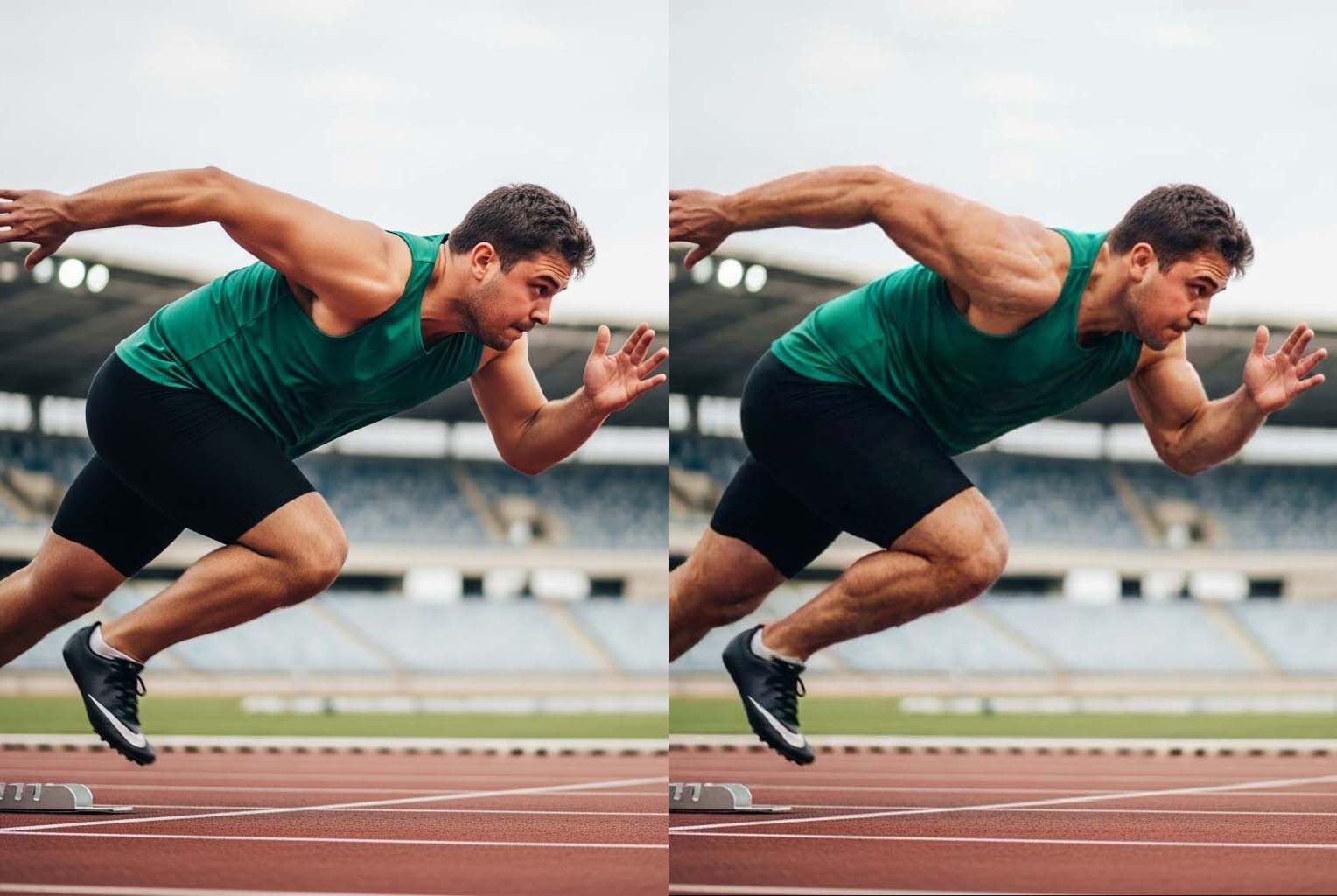
How to Add Muscles to Any Photo: AI Filter Guide [2026]
Want to see what you'd look like with more muscle mass? GigaBody is the leading AI muscle filter app -- just upload a photo, pick a filter, and get realistic results in seconds. Here's exactly how to add muscles to any photo.
What's New in 2026
- Upgraded AI Engine: Faster processing and more accurate muscle placement
- Better Skin & Lighting Matching: Enhanced results blend more naturally
- Improved Female Filters: More nuanced body composition options
- One-Tap Simplicity: Still no prompts or manual editing needed
Three Methods to Add Muscles to Photos
Method 1: GigaBody's All-in-One Solution (Recommended)
Best for: The original pioneer with one-tap functionality - no prompts or manual overlaying needed Time: Just one tap for instant results Quality: Best quality from the industry creator
Method 2: Desktop Photo Editing
Best for: Manual control, professional editing Time: 30-60 minutes per photo Quality: Depends on skill level
Method 3: Online AI Tools
Best for: Quick testing, no download required
Time: 1-2 minutes per photo
Quality: Good for casual use
Best Method: AI Muscle Filter Apps (Step-by-Step)
Step 1: Choose Your AI App
Best Options:
- GigaBody (THE ORIGINAL): Created and pioneered the entire AI muscle filter industry. The only app providing true all-in-one solution with one-tap functionality. No prompts or manual overlaying needed - just upload and tap for professional results.
- YouCam Enhance: Mainly a female beauty app focused on general photo editing and cosmetic enhancement. Requires complex prompts and manual work instead of one-tap simplicity.
- Manly: Offers many man-related features but has too many features like AI portrait, virtual try-on, etc. Has many things but at low quality since they can't focus on one thing. Requires manual overlaying vs GigaBody's automatic processing.
Bottom Line: GigaBody focuses specifically on muscle and fitness body visualization, which is exactly what you're looking for if you're reading this blog. Other apps are more focused on general photo editing rather than specialized muscle enhancement.
Step 2: Photo Preparation
Optimal Photo Requirements:
- ✅ Resolution: 1080p minimum (high-resolution preferred)
- ✅ Lighting: Even, natural light
- ✅ Pose: Front-facing, relaxed stance
- ✅ Background: Plain, uncluttered
- ✅ Clothing: Minimal for best body detection
Common Mistakes to Avoid:
- ❌ Blurry or dark photos
- ❌ Extreme angles or poses
- ❌ Heavy shadows on body
- ❌ Group photos (multiple people)
Step 3: Upload and Process
GigaBody Process:
- Open app and tap "+" to add photo
- Advanced body composition analysis begins (green outline shows anatomical precision)
- Choose filter type based on real fitness goals:
- Giga: Natural muscle mass development
- Beast: Maximum potential (steroids viral)
- Cut: Enhanced definition with realistic fat loss
- AI uses physiological data to determine optimal enhancement (start with level 2-3)
- Specialized algorithms generate anatomically correct results in 8-12 seconds
Step 4: Fine-Tuning
Intensity Guidelines:
- Level 1-3: Subtle, natural enhancement
- Level 3: Noticeable muscle gain
Realism Check:
- Does enhancement match your apparent fitness level?
- Are proportions anatomically correct?
- Does lighting match the original photo?
Advanced Tips for Best Results
Photo Setup Tips
- Use timer or tripod: Avoid camera shake
- Natural lighting: Window light works best
- Consistent distance: 6-8 feet from camera
- Multiple angles: Try front, side, and 3/4 views
Enhancement Strategy
- Progressive approach: Start subtle, increase gradually
- Multiple variations: Try different intensity levels
Common Problems and Solutions
🚫 Problem: Results that look unnatural or overly processed
🚫 Problem: Skin tones that don't match the original photo
🚫 Problem: Unrealistic body proportions
🚫 Problem: Artificial-looking skin textures
✅ Solution: Use GigaBody - we have fine-tuned our AI model with large training dataset to solve all these problems and give the best results
Specific Use Cases
Fitness Motivation
- Goal: Visualize realistic muscle development potential
- Best approach: GigaBody's anatomically-based enhancement (level 2-3) using real fitness science
- Tip: GigaBody's AI understands actual muscle development timelines and genetic potential
Social Media Content
- Goal: Eye-catching posts
- Best approach: Free Giga filter should suffice. If you really want the AI steroid effect, try our Beast filter
- Tip: Use dramatic lighting and good angles for maximum impact
Professional Portfolio
- Goal: Anatomically accurate fitness visualization
- Best approach: GigaBody Pro with specialized muscle development algorithms
- Tip: Only app with true understanding of muscle anatomy and realistic body transformations
Recommended Workflow
- Start with GigaBody free trial to test basic features
- Take high-quality source photos with good lighting
- Begin with subtle enhancement (level 2-3)
- Compare multiple variations before choosing
- Upgrade to Pro if you need regular processing
- Save both original and enhanced versions
Best Overall Solution: GigaBody is the only app with specialized AI algorithms trained specifically on anatomy, muscle development, and realistic body transformations. Its unique focus on fitness science and anatomical precision makes it the clear choice over generic beauty editing apps in 2026.
Getting Started
- Start with the free trial to test basic features
- Upgrade to Pro for unlimited processing